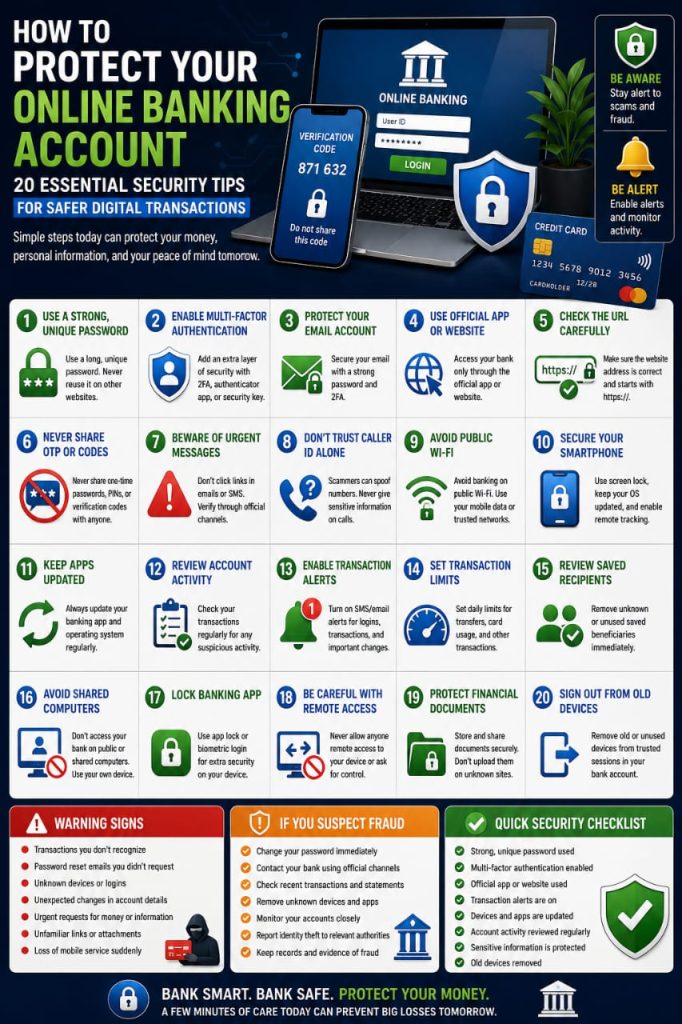

Online banking makes it easy to check balances, transfer money, pay bills, manage cards, and monitor transactions from almost anywhere. This convenience is valuable, but it also makes banking accounts attractive targets for phishing, account takeover, malware, fake support calls, and other forms of financial fraud.
Protecting an online banking account requires more than simply creating a password. Good security also depends on the device you use, the network you connect through, the way you respond to messages, and how quickly you notice unusual activity.
This guide explains practical steps that can help improve the security of your online banking account and reduce the risk of unauthorized transactions.
1. Use a Strong and Unique Banking Password
Your banking password should be different from every other password you use.
Never reuse a password from:
- Social media
- Shopping websites
- Cloud storage
- Business accounts
- Other financial services
If another website suffers a data breach, reused credentials could put your banking account at risk.
A strong password should be long, unique, and difficult to predict. Avoid personal information such as your name, birthday, phone number, or simple number patterns.
2. Enable Multi-Factor Authentication
Multi-factor authentication adds an additional verification step when someone attempts to access your account.
Depending on your bank, verification methods may include:
- Authenticator applications
- Trusted-device approval
- Security keys
- Biometric authentication
- One-time verification codes
This additional layer can make unauthorized access more difficult even if your password becomes exposed.
3. Protect the Email Connected to Your Bank Account
Your bank may use email for security alerts, password recovery, statements, and important notifications.
If your email account is compromised, an attacker may gain access to information that could help target your financial accounts.
Protect your email with:
- A separate strong password
- Two-factor authentication
- Updated recovery information
- Regular review of signed-in devices
4. Use the Official Banking App or Website
When accessing your account, use the official banking application or manually enter the bank’s legitimate website address.
Avoid signing in through unexpected links sent by email, SMS, social media, or messaging apps.
Phishing pages may closely imitate a legitimate banking website while sending your login information to an attacker.
5. Check the Website Address Before Signing In
Before entering your banking credentials, look carefully at the website address.
Attackers may register domains containing:
- Misspelled bank names
- Extra letters
- Unexpected numbers
- Additional words
- Unusual domain endings
A professional design does not prove that a page belongs to your bank.
If you are unsure, close the page and open the bank’s website or application through a trusted method.
6. Never Share Your One-Time Password
A one-time password, transaction code, PIN, or verification code should be treated as sensitive information.
If someone calls or messages you and asks for a code sent by your bank, do not automatically provide it.
An attacker may already be attempting to log in or authorize a transaction.
Only enter a verification code into an official process that you personally initiated.
7. Be Suspicious of Urgent Banking Messages
Financial scams frequently try to create fear or urgency.
You may receive a message claiming that:
- Your bank account has been blocked
- A suspicious transaction requires immediate verification
- Your card will be suspended
- Your account information must be updated
- A refund is waiting for confirmation
Some legitimate banking alerts can also be urgent, so the safest response is to verify the situation through the official banking app, website, or customer-service number.
8. Do Not Trust Caller ID Alone
A phone call may appear to come from a familiar number, but caller information can sometimes be misleading.
If an unexpected caller claims to represent your bank and asks for sensitive information, end the conversation and contact the bank independently.
Never provide:
- Your full password
- PIN
- Verification codes
- Security answers
- Remote access to your device
9. Avoid Banking on Public Wi-Fi
Public Wi-Fi can be convenient, but unknown networks deserve additional caution when financial information is involved.
When possible, avoid online banking through networks in:
- Airports
- Cafes
- Hotels
- Shopping centers
- Other public locations
Your personal mobile data connection or a trusted home network may be a better choice for financial activity.
10. Keep Your Smartphone Secure
If you use mobile banking, your smartphone becomes part of your banking security.
Protect it with:
- A strong screen lock
- Automatic locking
- Operating system updates
- Trusted applications
- Remote device-location features
Do not leave an unlocked phone containing banking apps unattended.
11. Keep Your Banking App Updated
Banking applications may receive updates that improve security, fix bugs, or address known vulnerabilities.
Install updates through your device’s official application store.
Avoid modified or unofficial versions of financial applications from unknown websites.
12. Review Account Activity Frequently
Regular transaction reviews can help you identify unusual activity before it becomes a larger problem.
Check for:
- Purchases you do not recognize
- Unknown transfers
- Unexpected withdrawals
- New payment recipients
- Unfamiliar fees
If something looks suspicious, investigate it promptly and contact your financial institution through an official channel.
13. Enable Transaction Notifications
Many banks allow users to receive alerts for account activity.
Depending on the bank, you may be able to receive notifications for:
- Card purchases
- Money transfers
- ATM withdrawals
- New login attempts
- Password changes
- Large transactions
Timely alerts can help you notice unexpected activity sooner.
14. Set Appropriate Transaction Limits
Some banks allow customers to adjust daily transfer, payment, or card limits.
If available, consider whether your limits are higher than you actually need for normal daily activity.
Lower limits may reduce potential exposure if an account or card is misused, while still allowing you to increase limits temporarily when necessary.
15. Review Saved Payment Recipients
Online banking platforms may allow you to save frequent recipients or beneficiaries.
Review this list periodically and remove accounts you no longer use or recognize.
If you find an unfamiliar recipient, investigate it immediately.
16. Avoid Banking on Shared Computers
A shared computer may store browser sessions, login information, or malicious software without your knowledge.
For important financial accounts, using your personal trusted device is preferable.
If you must use a shared device:
- Do not save your password
- Do not mark the device as trusted
- Sign out completely afterward
- Avoid downloading financial documents
17. Lock Your Banking App When Possible
Some banking applications allow additional biometric or PIN protection before the app opens.
This provides another layer of security if someone temporarily gains access to your unlocked phone.
Use app-level protection where available and appropriate.
18. Be Careful with Remote Access Requests
A common scam involves someone claiming to be technical support, bank staff, or a fraud investigator and asking you to install remote-access software.
Giving another person remote control of your device may expose:
- Your banking session
- Passwords
- Verification codes
- Personal documents
- Other financial information
Do not install remote-access software or share your screen because of an unsolicited call or message.
19. Protect Financial Documents
Bank statements, transaction records, card documents, tax records, and identification documents may contain sensitive information.
Store them securely and avoid sending them through unknown websites or untrusted messaging channels.
If you no longer need a physical financial document, dispose of it appropriately rather than leaving it where others can easily access it.
20. Sign Out from Old Devices
Your banking account may remain authorized on an old smartphone or computer after you stop using the device.
Before selling, recycling, or giving away a device:
- Sign out of financial applications
- Remove stored accounts
- Back up necessary information
- Use the manufacturer’s recommended factory reset procedure
If your bank provides a list of trusted devices, remove the old device there as well.
Be Careful with Fake Banking Apps
Fraudulent applications may imitate legitimate financial institutions.
Download banking apps only from the official app store and confirm the developer information before installing.
If your bank provides a direct link to its official application from its website, that can also help you identify the correct app.
Do Not Ignore Small Unauthorized Transactions
An unfamiliar transaction does not need to be large to deserve attention.
If you notice a small payment you do not recognize, check recent purchases and subscriptions.
If it remains unexplained, contact your bank or card provider promptly.
Use Card Controls If Your Bank Provides Them
Some banking applications allow customers to temporarily lock a payment card or control specific types of transactions.
Depending on the provider, controls may include:
- Online purchases
- International transactions
- ATM withdrawals
- Contactless payments
These features can be useful when a card is temporarily missing or when certain transaction types are unnecessary.
Watch Out for Fake Refund Scams
A scammer may claim that you are owed a refund and ask you to provide banking credentials or verification codes.
Some scams may even pretend that too much money was refunded and pressure you to send money back.
Verify unexpected refunds directly through the company or financial institution involved.
Be Cautious with QR Code Payments
QR codes can make payments convenient, but a code may point to a destination different from the one you expected.
Before approving a transaction, confirm:
- The recipient
- The amount
- The payment purpose
- The merchant information
Do not approve a payment simply because someone tells you to scan a code quickly.
What Should You Do If You Lose Your Bank Card?
If your debit or credit card is lost, use your bank’s official app, website, or support channel to report it as soon as possible.
If available, temporarily locking the card can help prevent additional transactions while you determine whether it is genuinely lost.
Follow your bank’s instructions for replacement or permanent cancellation.
What Should You Do If Your Phone Is Stolen?
If a stolen phone contains banking applications, take action quickly.
Depending on your situation, consider:
- Using the official device-location service
- Locking the phone remotely
- Contacting your mobile provider
- Changing your primary email password
- Contacting your bank
- Removing the device from trusted sessions
If recovery appears unlikely and sensitive information is at risk, remote erasure may be appropriate where available.
What Should You Do If You Entered Banking Details on a Fake Website?
If you realize that you entered your banking credentials on a suspicious page, act immediately.
Use a trusted device and the official banking channel to secure the account.
Depending on what information was exposed, actions may include:
- Changing your password
- Contacting the bank
- Reviewing recent transactions
- Removing suspicious devices
- Reviewing two-factor authentication
- Monitoring further activity
What Should You Do If You See an Unauthorized Transaction?
Contact your financial institution through an official support channel as soon as possible.
Keep useful information such as:
- The transaction date
- The amount
- The merchant or recipient
- Relevant messages
- Any suspicious communication
Follow the bank’s official fraud-reporting and dispute process.
Common Online Banking Security Mistakes
Many financial security incidents involve avoidable habits.
Common mistakes include:
- Reusing banking passwords
- Sharing one-time codes
- Clicking unexpected banking links
- Ignoring transaction alerts
- Using public Wi-Fi for sensitive transactions
- Installing unofficial banking apps
- Giving strangers remote device access
- Leaving old devices authorized
- Failing to review financial activity
A Simple Online Banking Security Checklist
Use this checklist to review your financial account security:
- Use a unique banking password
- Enable multi-factor authentication
- Secure your primary email
- Use the official banking app or website
- Never share verification codes
- Keep devices updated
- Avoid banking on unknown Wi-Fi
- Enable transaction alerts
- Review account activity regularly
- Remove old trusted devices
- Review saved payment recipients
- Protect financial documents
Frequently Asked Questions
Is online banking safe?
Online banking can be reasonably secure when you use your bank’s official services, protect your login credentials, keep devices updated, and remain alert for phishing and fraud attempts.
Should I use the banking app or website?
Both can be appropriate when they are official and your device is secure. Use the bank’s official app or manually access its legitimate website rather than following unexpected login links.
Can a bank employee ask for my password?
You should be extremely cautious if anyone asks for your complete password, PIN, or one-time security code. Verify any unusual request through your bank’s official customer-service channel.
Is it safe to use fingerprint login for banking?
Biometric authentication can provide convenient protection when supported by a secure device and used alongside an appropriate device PIN or password.
What should I do if I receive a suspicious bank SMS?
Avoid clicking the included link. Open your banking app directly or contact the bank through an official number to verify the message.
How often should I check my bank account?
Regular monitoring is useful because it can help you notice unauthorized transactions earlier. Transaction notifications can provide additional awareness between manual reviews.
Final Thoughts
Online banking security depends on a combination of strong account protection and careful everyday behavior.
Use a unique password, enable multi-factor authentication, protect your email and smartphone, avoid suspicious links, and review financial activity regularly.
Taking a few minutes to strengthen your banking security today can help protect your money, personal information, and financial accounts from many common forms of online fraud.